Guide School
Classes, deadlines and school email in one place
“How do I keep my classes, deadlines and school email in one place?”
In CoordXYZ, each course gets a board with its files, slides and lecture notes. The Secretary reads your school mail and your Canvas, Brightspace, Blackboard or Moodle calendar and keeps only what asks something of you: deadlines, replies owed, events. Study keeps each course as a tree of points, marks how well you know each, and asks a few questions each morning on the ones you know least.
Secretary
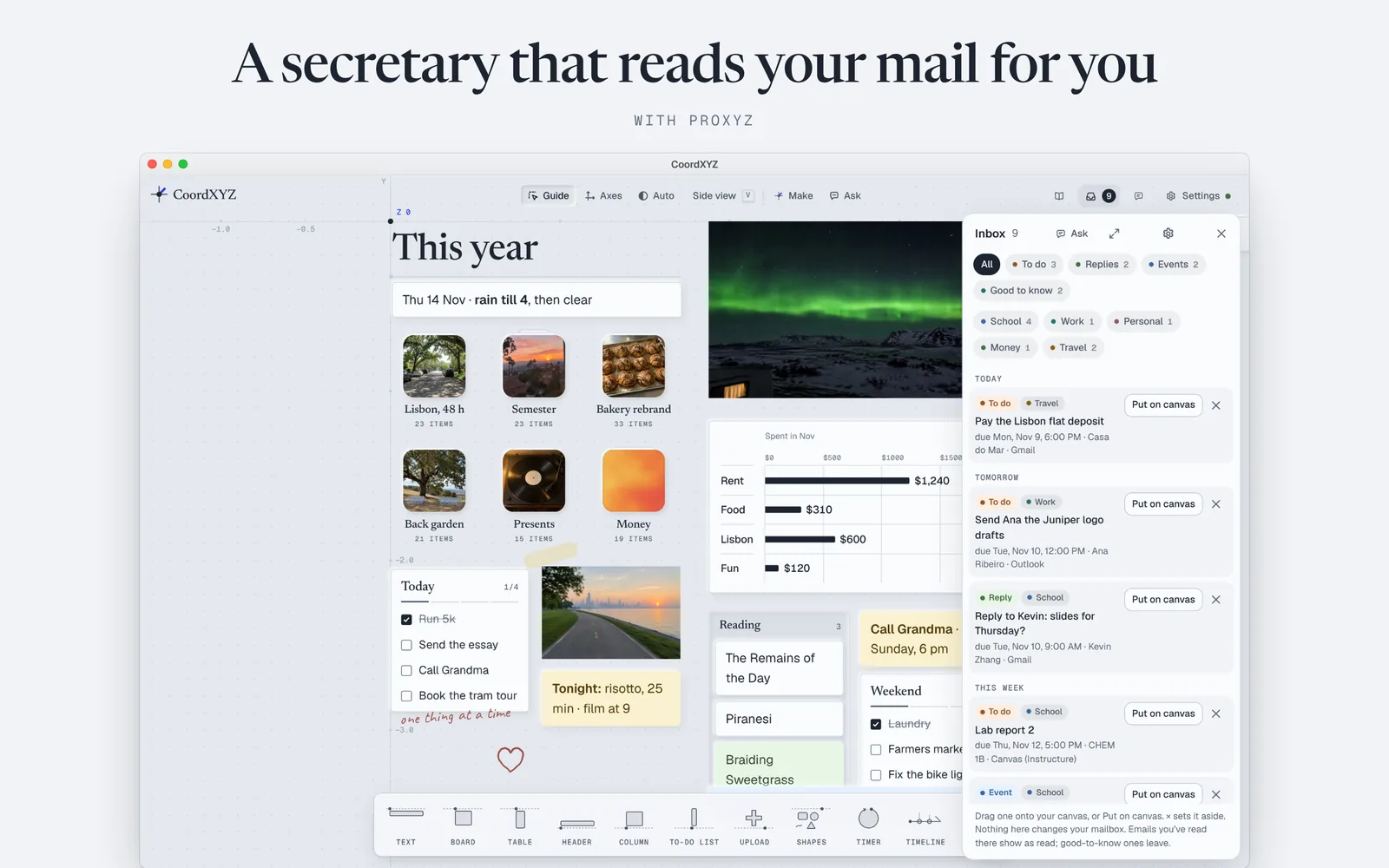
The Secretary's Inbox on a Mac: to-dos, replies owed and events from Gmail, Outlook and Canvas, each with Put on canvas, beside a This year board.
Set up a term in an afternoon
- A board for each course. Start from the Semester or Lecture notes template, or draw a square for each course. Put the syllabus, the slides and the readings on its board.
- Connect your school mail. In Settings → Connections: Gmail and Outlook connect by signing in; QQ, 163, a school's or any other IMAP mailbox connects with a password for apps.
- Connect your calendar. Paste the private link of your Canvas, Brightspace, Blackboard, Moodle or ManageBac calendar, or of a Google or Outlook calendar. Due dates and events come in as they are.
- Work from the Inbox. Only what asks something of you waits there: an assignment and its due date, a reply owed, an event. Drag each onto its course's board, or set it aside. Nothing lands on the canvas by itself.
- A few questions every morning. Study marks how well you know each point of a course, and each morning asks questions on the points you know least, in the app and by email.
- Let the AI help. Select a syllabus and choose Make from this… for a study plan, turn lecture notes into a mind map, or ask a question across every course's board.
The Secretary (early access) and Study come with ProXYZ and UltraXYZ.
For professors
A board for each course, with its lectures, readings and office hours; the Secretary picks out what students' emails ask of you, from questions to deadlines; and a shared board for a lab or a class, to view or to edit together.
What it looks like
AI link (moving)
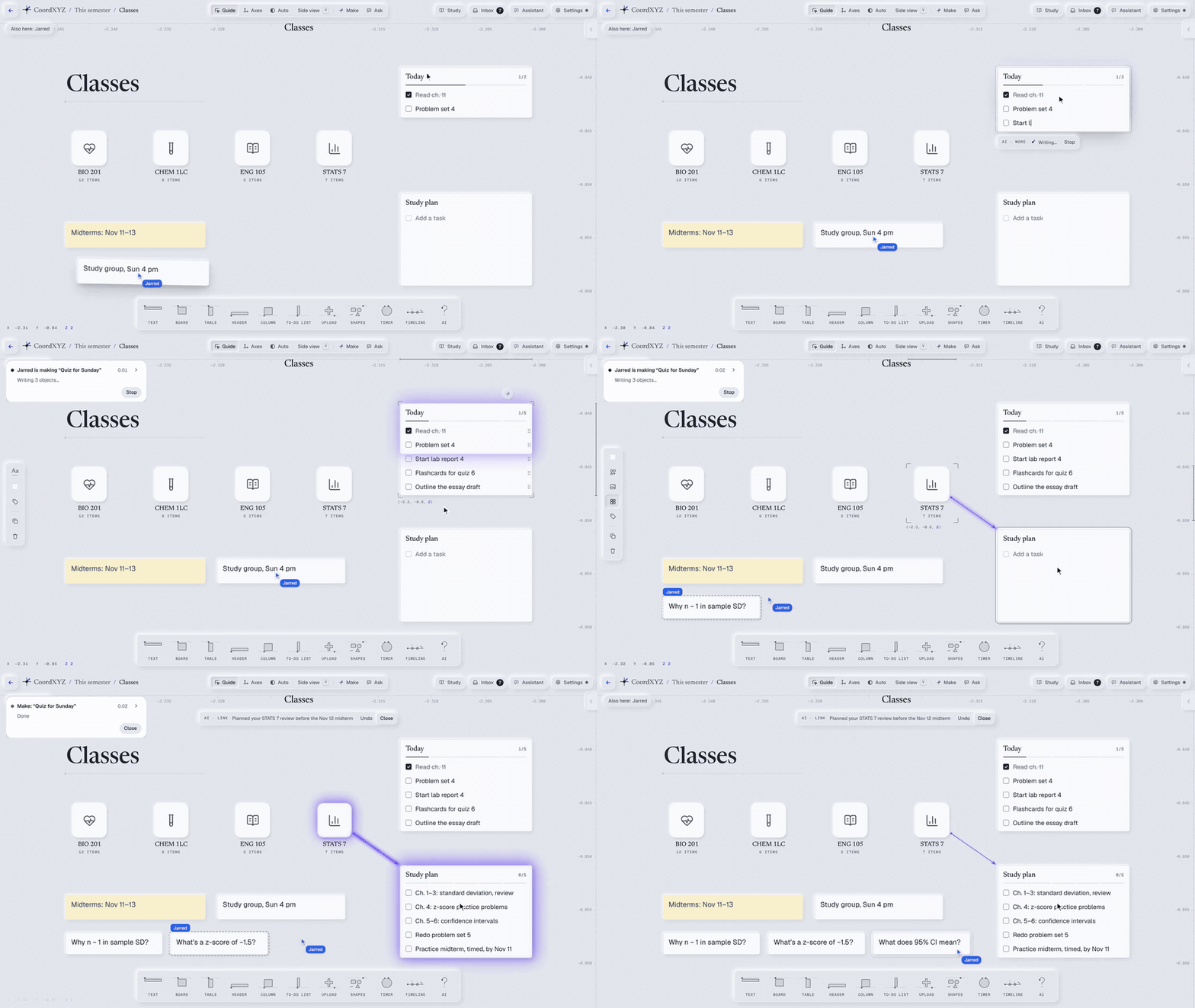
On a student's Classes board, shared with a friend: the AI adds three tasks to Today, writes three quiz questions, and an AI link from the STATS 7 course writes the study plan for its midterm, and keeps it current.
Study
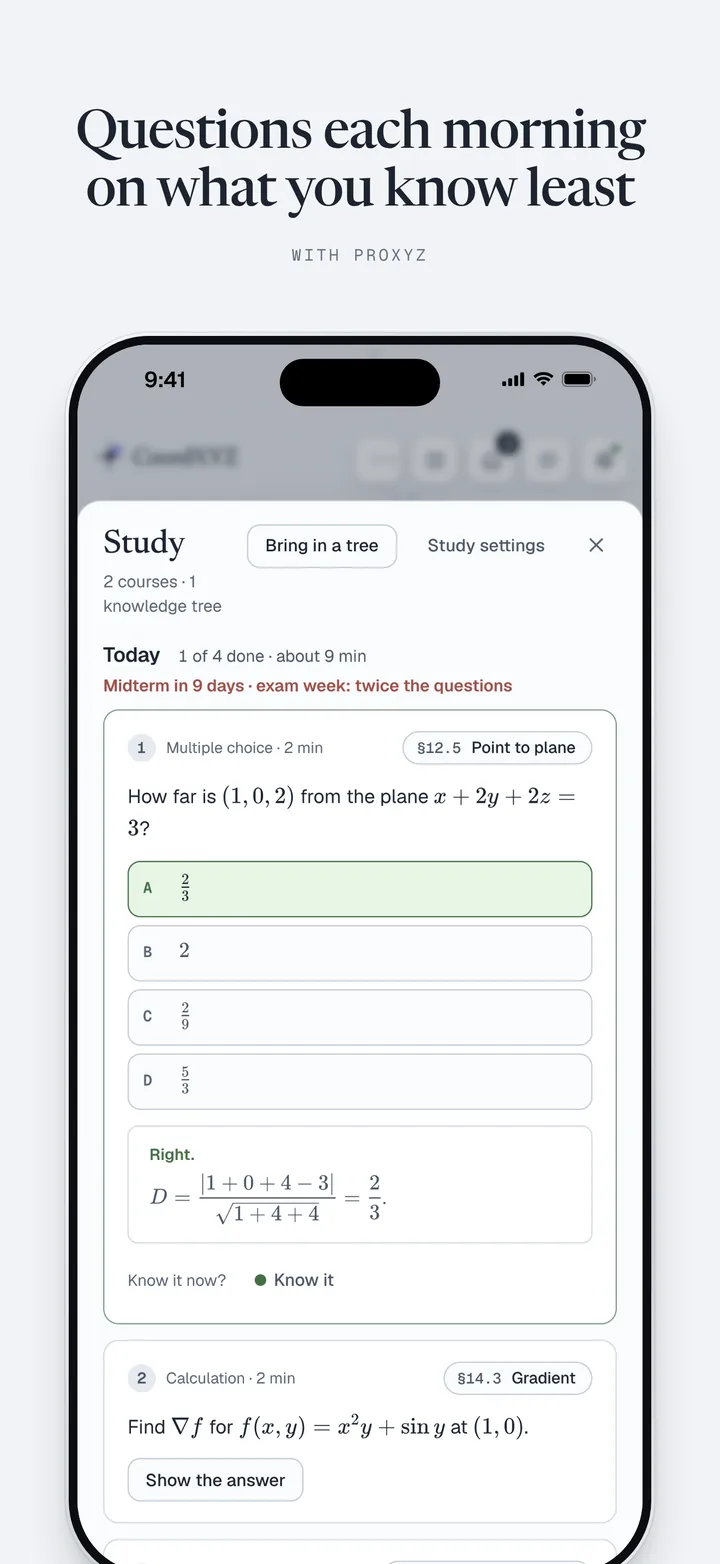
Study on iPhone: the morning's questions on the points of a course you know least, with the worked answer.
Questions
Does it work with Canvas?
Yes. Paste your Canvas calendar's private link in Settings → Connections, and assignments' due dates and events come into the Inbox. Brightspace, Blackboard, Moodle, ManageBac and any iCalendar feed work the same way.
Which email accounts can it read?
Gmail, Outlook.com and Microsoft 365, and any IMAP mailbox: QQ, 163, 126, iCloud, Yahoo, or a school's.
Does the Secretary put things on my canvas?
No. What it finds waits in the Inbox, and you decide: drag it onto a board, or set it aside.
Can I share a board with classmates?
Yes. Send a link to the board, to view it or edit it together, live. Sharing comes with ProXYZ and UltraXYZ.
What does it cost?
The free trial has 100 objects, 200 MB and 200 AI credits. The Secretary, Study and sharing come with ProXYZ, from $5.90 a month, and UltraXYZ, from $12.90 a month, both paid yearly.
Try it
CoordXYZ runs in any modern browser on a computer, with nothing to install, and as apps for Mac, Windows, iPhone and iPad. One account keeps them in sync as you work, and it keeps working offline.
More guides
- Turn a PDF into a mind map“Can I turn a PDF or a document into a mind map?”
Drop the file on a board, choose Make from this…, and ask for a mind map.
- Capture the three most important ideas in your life“My head is full of ideas and ambitions, but I don't know where to start.”
Put every idea down, then give the three that matter most a board each, every day.
- A Life Compass: your whole life on one board“Is there an app that can guide my life, like a life compass or a life dashboard?”
One board for a whole life, a board for each part of it, seen at once in 3D.
把课程、截止日期和学校邮件放在一起
“怎样把课程、截止日期和学校邮件放在一起管理?”
在 CoordXYZ 里,每门课一张看板,放上它的文件、课件和笔记。秘书读取你的学校邮件,以及 Canvas、Brightspace、Blackboard 或 Moodle 的日历,只留下需要你处理的事:截止日期、该回的邮件、要参加的活动。学习功能用一棵知识点树记下每门课,标出你对每个点的掌握程度,每天早上就你最不熟的点出几道题。
设置方法:在“设置 → 已连接的账户”里连接邮箱(Gmail、Outlook 直接登录;QQ、163 或学校邮箱用授权码)和课程日历的私人链接。收件箱里的事项不会自己跑到画布上,由你拖到对应课程的看板上,或者先放一边。(秘书和学习功能属于 ProXYZ 和 UltraXYZ。)