Guides Updated 13 November 2026
How people use CoordXYZ
One question in each guide, as people ask it, answered with the real app: what to do, step by step, and the pictures that show it.
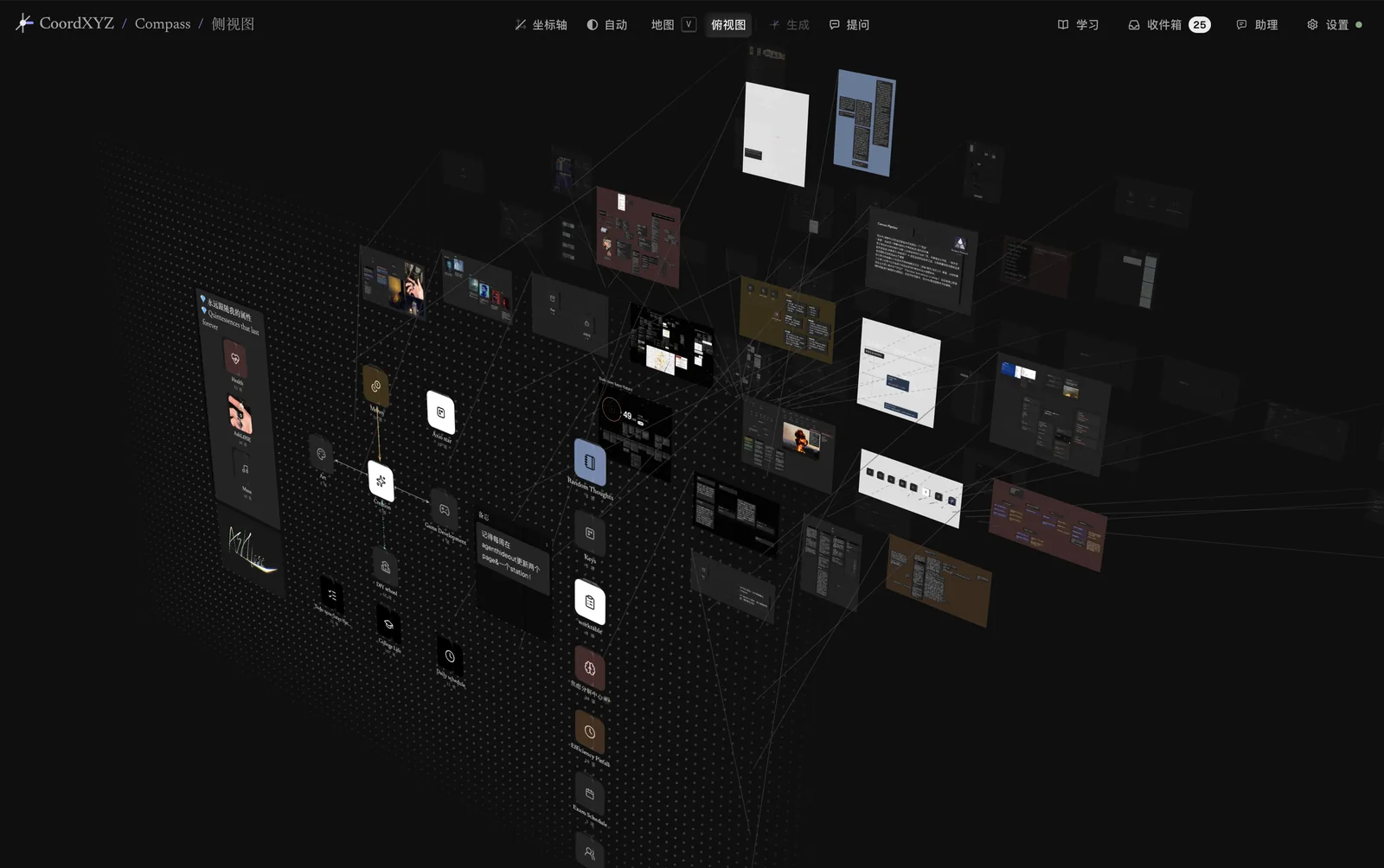
The 3D mind map
A Life Compass in the side view: every board inside it, and every board inside those, stands apart as a layer along Z.
Capturing and organizing
- Capture the three most important ideas in your life“My head is full of ideas and ambitions, but I don't know where to start.”
Put every idea down, then give the three that matter most a board each, every day.
- A Life Compass: your whole life on one board“Is there an app that can guide my life, like a life compass or a life dashboard?”
One board for a whole life, a board for each part of it, seen at once in 3D.
- Organize a side project on one board“I want to start a side job I direct myself. Are there any tools I can use to organize it?”
The goal, a board for each part, to-dos for now and later, and a first plan from the AI.
Mind maps
- A 3D mind map, made of your real work“Is there a 3D mind map?”
Every board a level along Z, and the side view stands them apart in 3D.
- Turn a PDF into a mind map“Can I turn a PDF or a document into a mind map?”
Drop the file on a board, choose Make from this…, and ask for a mind map.
Creative work and school
- A reference board for lots of pictures“Where can I put lots of reference pictures?”
Pictures, videos, PDFs and links on a canvas with no edges, a board per character or scene.
- Classes, deadlines and school email in one place“How do I keep my classes, deadlines and school email in one place?”
A board per course, the Secretary for school mail and Canvas, and Study's morning questions.
Compared with other tools
- A simpler alternative to Notion“Notion is too hard. Is there a simpler one?”
A canvas you draw on, with no blocks or databases to learn first.
- A Miro alternative for your own thinking“Miro is made for team workshops. Is there a whiteboard for my own ideas?”
A canvas for one person's life and work first, with boards inside boards seen in 3D.
- A Milanote alternative with depth you can see“Is there an app like Milanote, but where I can see every board at once?”
Boards inside boards too, and every level seen at once, in 3D and as a map.
Try it
CoordXYZ runs in any modern browser on a computer, with nothing to install, and as apps for Mac, Windows, iPhone and iPad. One account keeps them in sync as you work, and it keeps working offline.
指南:人们怎样使用 CoordXYZ
每篇指南回答一个人们常问的问题,用真实应用的截图,一步一步说明怎么做。
- 留住人生中最重要的三个想法“脑子里装满了想法和抱负,却不知道从哪里开始。”
- 人生仪表盘:把整个人生放在一张看板上“有没有一个能指引人生的应用,像人生仪表盘一样?”
- 在一张看板上理清副业“我想开始一份自主的副业,有什么工具可以把它理清楚?”
- 3D 思维导图:用你真实的内容搭成“有没有 3D 思维导图?”
- 把 PDF 变成思维导图“能把 PDF 或文档变成思维导图吗?”
- 放大量参考图的看板“有没有可以放大量参考图的地方?”
- 把课程、截止日期和学校邮件放在一起“怎样把课程、截止日期和学校邮件放在一起管理?”
- 比 Notion 更简单的选择“Notion 太难用了,有没有更简单的?”
- Miro 之外,一块给自己用的白板“Miro 是给团队开会用的,有没有给自己整理想法的白板?”
- Milanote 之外:看得见的深度“有没有像 Milanote 一样、但能一眼看到所有看板的应用?”